Animate Old Photos
Bring old photos to life online: upload a black-and-white or faded print, pick a smile, a blink or a turn toward the camera, and most videos are ready in about two minutes.
1Add your old photo
JPG, PNG or WebP, up to 10MB.
2Describe the motion
Or pick a motion
3Quality & length
Length
2s
Resolution
480P · 2s · 8 credits
Keeps the photo's own black-and-white or faded colors — only the people move.
Try It Free — No Credit CardPhoto Animation Maker
This photo animation maker runs in your browser and saves each result as a video file you can keep, share or put in a slideshow.
- File
- MP4 video, with a sound track the AI makes to fit the scene
- Length
- 2 to 15 seconds; you choose before you start
- Resolution
- 480P or 768P
- Shape
- Follows your photo: landscape, square or portrait
- Last frame
- Optional: a second picture for the video to end on
- Kept
- In your My Creations for at least 100 days, ready to download again
Bring Old Photos to Life
Old photos come to life from a single picture: the photo becomes the first frame of the video, and the people in it move from there. Three steps take you from the print to the video.
- 01
Scan or photograph the print
Scan the photo flat, or photograph it straight on in even daylight with no glare. Crop away the border and the album page. A photo of 300 × 300 px or larger works best.
- 02
Pick how it moves
Tap Smile, Blink or Look at camera, or describe the movement in your own words, then start. Most videos are ready in about two minutes.
- 03
Download the MP4
Save the video to your phone or computer. It also stays in your My Creations.
Animate Old Family Photos
Animated family photos are made the same way as a single portrait: the whole group photo becomes the first frame, and the prompt says who moves. For family photo animation, name each person by where they stand.
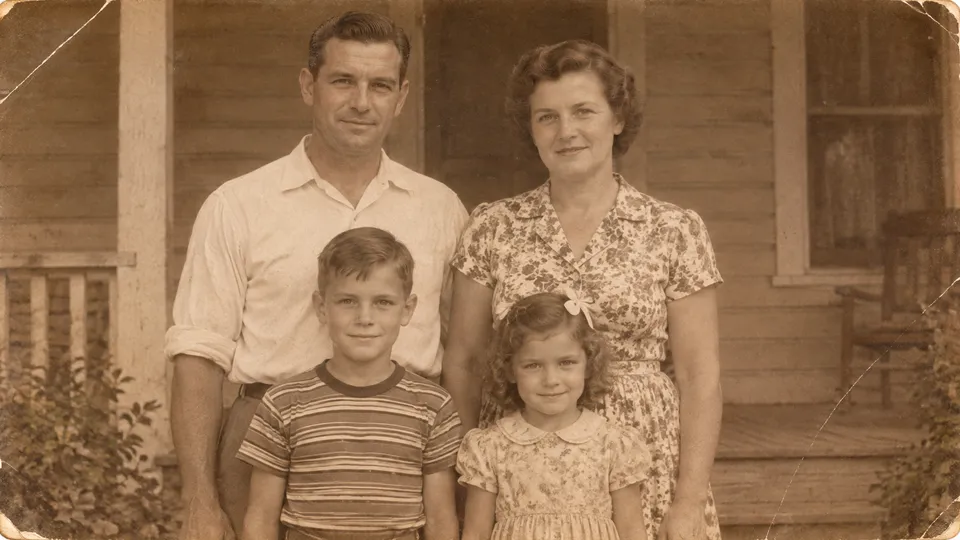
The photo
The video
Tips for group photos
- Use a photo in which every face is clear; if the group stands far away, crop in on them.
- Name who moves and how, e.g. "the grandmother on the left smiles, the boy blinks".
- Start with the shortest clip to check the faces, then make a longer one.
Make Old Photos Move
To make old photos move, tap a preset under the prompt box: it writes the motion into the box, where you can read and change it. These three suit old portraits:
Smile
The face slowly breaks into a warm, natural smile.
Blink
The person blinks softly and looks at the camera with a gentle smile.
Look at camera
The person turns their head toward the camera until their eyes meet the lens.
Laugh, Wink and Surprise are there too, for a livelier result.
Gentler or livelier: say it in the prompt
- Gentle
- She blinks once and smiles slightly; her head stays almost still. Keep the photo black and white.
- Livelier
- He laughs, his shoulders lift and he turns his head toward the camera. Keep the faded colors.
For Reunions, Tributes and Family Trees
A moving portrait of a grandparent or an ancestor brings people together around the old family album. Three ways to use one:
Reunion slideshows
Make a short clip of each grandparent, great-aunt or wedding photo and play them in a row on a TV or a projector. The video takes the shape of the photo, so crop it to 16:9 before you upload for a landscape screen.
Tributes and memorials
For a memorial or a tribute video, a slow smile or a look toward the camera is often enough. The video comes with sound; mute it in your editor or slideshow app if you want silence.
Family tree posts
Add a moving portrait of an ancestor to a family tree profile, a family group chat or a social post. For a phone screen, crop the photo square or tall before you upload.
New accounts get free credits, enough for a first short video. No credit card.
Questions About Animating Old Photos
Is old photo animation free?
You can start free: new accounts get free credits, enough for a first short video at the lowest resolution, and no credit card is needed to sign up. Longer clips and higher resolutions cost more credits; the panel shows the exact number before you start, and the credits come back if a generation fails.
Do I need to sign up or download an app?
There is no app to download: this old photo animator runs in a web browser such as Chrome, Safari, Edge or Firefox. You need a free account to start a generation, so the video is saved to your My Creations.
Can I animate an old photo on my phone?
Yes. Open this page in your phone's browser, take a photo of the print or choose one from your photo library, and start. You can animate old pictures and download the MP4 on the same phone.
What kind of photos work best?
A sharp scan, or a straight-on photo of the print, of 300 × 300 pixels or larger, in which each face is clear. Black-and-white, sepia and faded color photos all work, so vintage photo animation and historical photo animation follow the same steps. Crop off the album page and the white border before you upload.
Can I control how the photo moves?
Yes. Tap Smile, Blink or Look at camera, or write the movement yourself, e.g. "she blinks and smiles slightly". In a group photo, name who moves. The same works when you animate ancestor photos for a family history.
How long is the video, and what format is it?
Each video is 2 to 15 seconds long, at 480P or 768P, and downloads as an MP4 file with a sound track the AI makes for the scene; you choose the length and the resolution before you start. Most moving photos are ready in about two minutes.
Are my photos saved?
Your uploaded photo is deleted automatically within 48 hours and is used only to make the video you asked for, never to train models. The finished video stays in your My Creations for at least 100 days, and you can ask us to delete your data at any time.